
EmailChatMeetingClickUp
Your team works around ClickUp, not in it.
Updates still happen in email, chat and meetings. ClickUp exists, but it isn't the place where the team actually works.
Turn ClickUp into an operating system your team actually uses — with clearer processes, smarter automation and better visibility across the business.
Most ClickUp problems aren't really ClickUp problems. They usually start with unclear processes, inconsistent workflows or a workspace that grew without a clear system.
Updates still happen in email, chat and meetings. ClickUp exists, but it isn't the place where the team actually works.
Spaces, Lists, statuses, Custom Fields and views accumulated over time without a clear architecture.
Manual updates, repetitive tasks, status chasing and unnecessary handoffs consume time that could be automated.
Management still has to ask what's happening because dashboards and reporting don't provide clear, reliable answers.
Example operating system
One connected system for processes, people, automation and visibility.
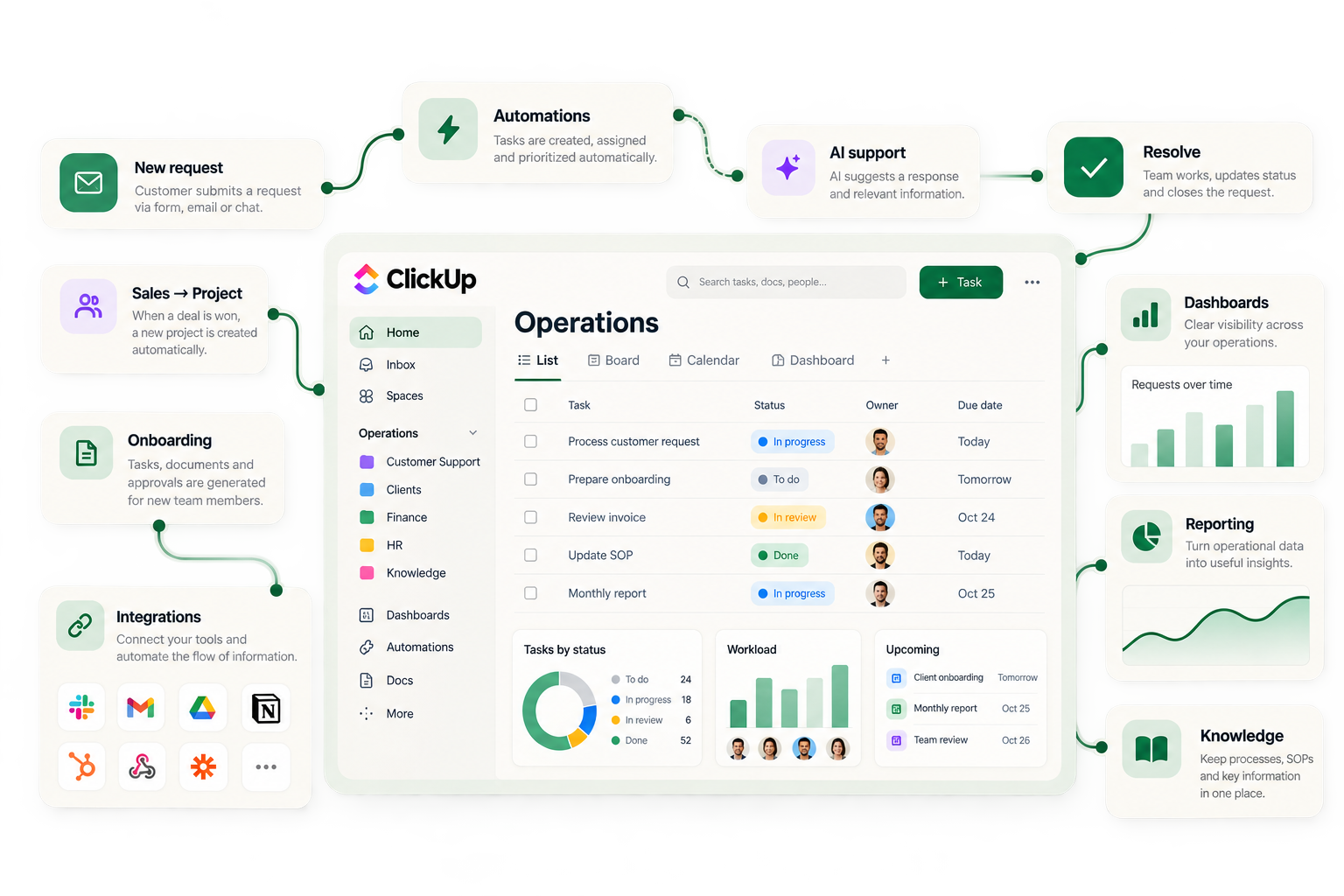
ClickUp becomes valuable when it reflects how your business actually works. Here are examples of operational systems we can design, build and improve.
Create clear ownership, escalation rules, service levels and operational visibility around customer requests.
Turn recurring HR processes into structured workflows with responsibilities, deadlines and automation.
Structure the operational workflows around financial documentation, approvals and coordination without turning ClickUp into accounting software.
Create a repeatable onboarding process that reduces manual coordination and makes responsibilities clear.
Turn day-to-day operational information into useful management visibility.
Use ClickUp Automations, integrations and AI where they genuinely remove repetitive work and improve the process.
A practical example
Imagine a new client has just signed. Instead of relying on emails, spreadsheets and someone remembering what happens next, the entire onboarding process can follow a structured workflow.
Trigger
Deal won
Trigger
A client accepts the proposal or a deal changes to Won.
System
New client project
Project created
Automatic setup
The client project, standard tasks and workflow are created automatically.
System
Client info collected
Form & documents
The information needed to start the work is collected in one structured place.
People
Prepare kick-off
Tasks assigned
Owners & deadlines
Tasks are assigned to the right people with clear responsibilities and deadlines.
Automation
Automations run
Less manual coordination
Repetitive actions, notifications and handoffs happen automatically where appropriate.
People
Delivery
Work completed
The team can see exactly where the client is in the process and what happens next.
Visibility
Onboarding progress
Clients in progress
Tasks at risk
Completed this month
Dashboard updated
Real-time visibility
Management gets visibility without having to ask the team for status updates.
The value isn't the automation itself. It's having a process where everyone knows what happens next.
That's the difference between configuring ClickUp and designing an operating system around your business.
Could a process in your business work like this? Let's talkBefore
After
The goal isn't to move chaos into ClickUp. The goal is to simplify how work happens first — then build a system the team can actually rely on.
I use ClickUp because I've spent more than 20 years running and improving operations.
Before WorksForYou, Miguel spent more than two decades working across operations, customer experience, finance operations, process improvement, automation, SaaS systems and growing teams.
That experience shapes how we approach ClickUp: process first, technology second.
About Miguel20+
Years of business and operations experience
8+
Years working with ClickUp
47
People in an organization whose operations I helped manage
~1,000
Customers supported by operational systems I've helped build and improve
These figures describe Miguel's operational experience across roles and tools — not results produced by ClickUp alone.
We don't start by adding fields, views and automations. We start by understanding how the work should actually happen.
How does the work actually happen today?
Remove unnecessary steps, duplication and complexity.
Define the workflow, responsibilities, statuses and information flow.
Configure ClickUp around the process — not the other way around.
Remove repetitive work using ClickUp Automations, integrations and AI where appropriate.
Measure, refine and evolve the system as the business changes.
Work & structure
Customers & people
Knowledge & visibility
Automation & AI
Your operating system
Not every process should be automated. We identify the repetitive work that creates friction, connect the right systems and use automation or AI where it genuinely saves time, improves consistency or helps people make better decisions.
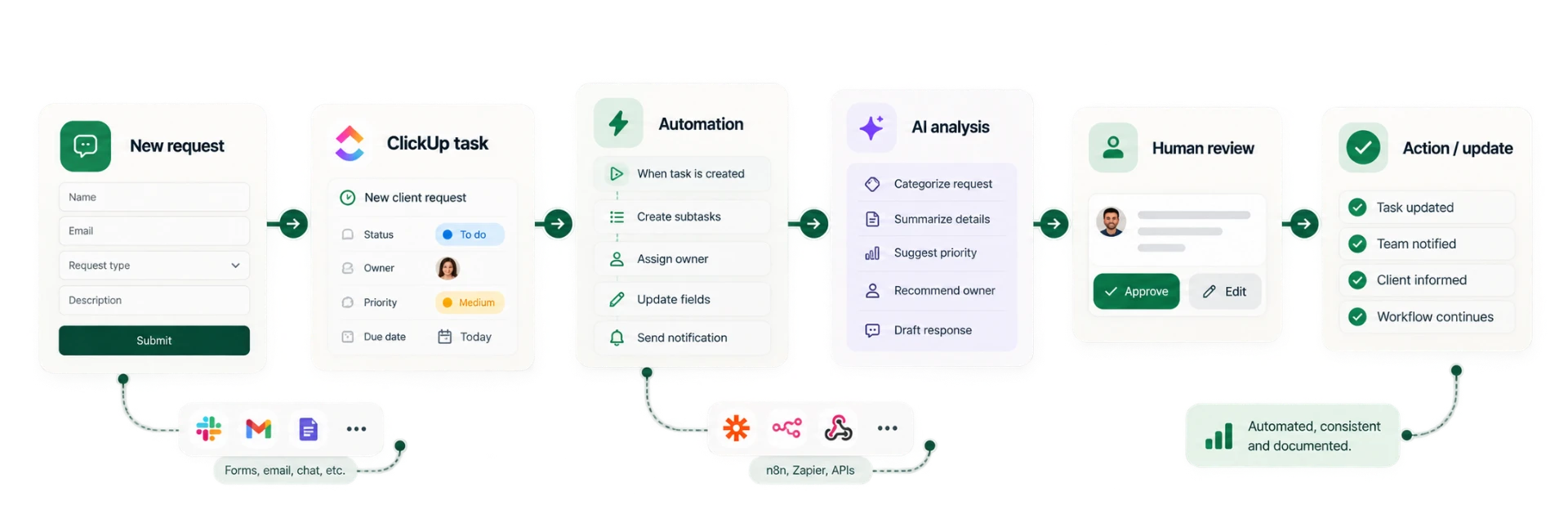
Swipe to see the full workflow
Automation isn't about removing people. It's about removing the repetitive work that prevents people from doing their best work.
01
02
03
WorksForYou combines operational experience with official ClickUp VSP certification to help businesses design, implement, improve and manage practical ClickUp systems.
View official ClickUp VSP profileTell me what's not working. In 30 minutes, we'll identify where ClickUp is creating friction and whether there's a practical way to fix it.